How to prepare a sketch (line art) for whiteboard animation
Tips to prepare a sketch or line art that animates well: contrast, line weight, background, resolution, scanning drawings and using AI.
In a hand-drawing video, the drawing is everything. The tool follows the lines in the image; if the lines are messy, so is the animation. The good news: preparing a good sketch for whiteboard animation does not require being a professional illustrator, just following a few simple rules. Here they are, and how to apply them in Editor de Vídeo Online.
The 6 rules of a sketch that animates well
- Dark lines on a light background. Black or graphite on white or beige.
- High contrast. Avoid light-gray lines that disappear.
- No large fills. Solid painted areas become slowly drawn "blobs".
- Minimal shading. Fine hatching turns into noise.
- Clean background. No stains, folds or hand shadows from photographing.
- Composition planned for the format. 9:16 for Reels, 16:9 for YouTube.
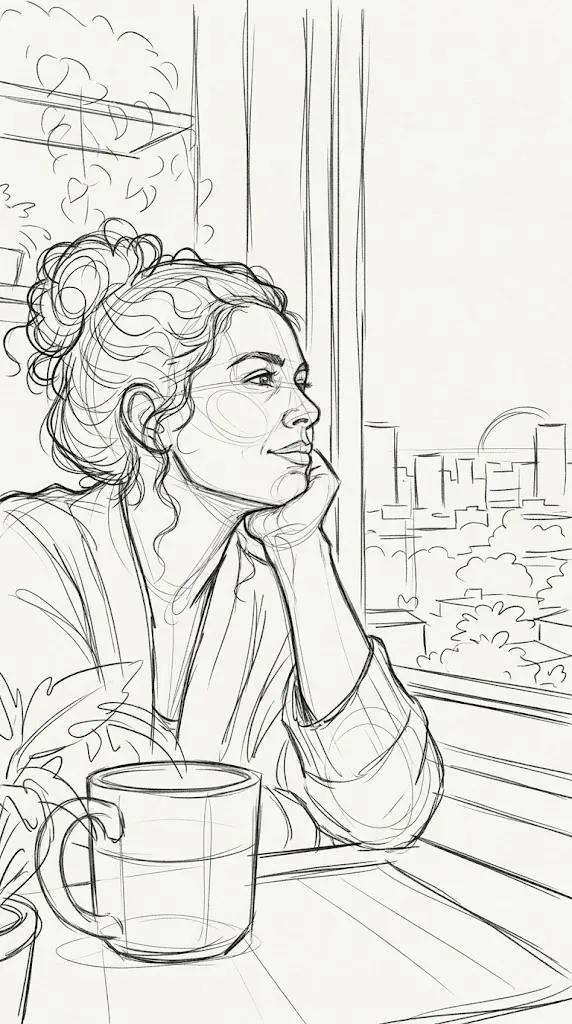
The example above follows the rules: black lines, a light background and little shading. Even the light construction lines on the face work, because overall contrast is good.
Drew it on paper? How to scan it
- Ink over the pencil with a black pen, or darken the graphite.
- Photograph it in natural light, from above, without the phone's shadow.
- Adjust contrast in any editor: increase contrast and lighten the background until it is almost white.
- Crop the edges of the sheet.
- Export as PNG or JPG at good resolution (at least 1080 px on the short side).
Phone document-scanner apps do steps 2 to 4 automatically.
Drawing on a computer or tablet
- Use a solid ink brush, not a very grainy pencil texture.
- Keep consistent line weight (for example 4 to 8 px on a 1080 px canvas).
- Draw on one layer over a white background and export flattened.
Using AI to generate the sketch
Editor de Vídeo Online's AI Prompts gallery has Line-art sketch and Explanation with icons cards, ready to paste into ChatGPT or Gemini. If you write your own prompt, include: "clean line art, black lines on plain white paper, no shading, no color". See the guide to AI image prompts ready to animate.
Editor de Vídeo Online settings that compensate for the sketch
| Sketch problem | Editor de Vídeo Online setting |
|---|---|
| Light lines do not appear | Increase stroke sensitivity |
| Dirt or paper texture gets drawn | Decrease sensitivity |
| Thick lines revealed "in chunks" | Increase brush thickness |
| Fine details look blurry | Decrease brush thickness |
| Yellowish photo background | Switch the background to white or beige: only the line goes onto the paper |
Drawing order and storytelling
The hand draws lines in sequence. Thinking about composition helps: give the main element prominence and leave space around it. If the story has several stages, make one sketch per stage and join the scenes in the Studio, as explained in how to edit the final video on the timeline.
Frequently asked questions
Can I animate a color drawing?
You can, but the hand-drawing effect works best with line art. For colorful artwork with many elements, the Vox collage usually looks better.
What resolution should I use?
At least 1080 px on the short side. Higher resolutions give crisper edges, but the hand may need a larger size.
What if my drawing has text?
Write it large with a thick line. Small text becomes unreadable on phones.
Conclusion
A good sketch is dark, clean and simple. Follow the six rules, tune sensitivity and thickness in Editor de Vídeo Online, and your drawing will come to life naturally. Test your sketch now.
Make your animated video now
Editor de Vídeo Online runs in your browser (Chrome or Edge): upload an image, pick a style and record an MP4. Nothing to install.
Try Editor de Vídeo Online →
Editor de Vídeo Online Team
Written by the Editor de Vídeo Online team, the in-browser animation tool for hand-drawn whiteboard videos, Vox-style collages and paper cutout effects.