Character in the center of the collage: animated portraits
Learn to create animated portraits with a character in the center of the collage and elements around it: composition, AI prompt, entrance order and camera.
One of the strongest compositions in collage animation is the character in the center: a cut-out person in the spotlight, surrounded by objects, symbols and scribbles that tell who they are or what they are going through. It is perfect for biographies, personal introductions, testimonials and stories. Here is how to create an animated portrait like that with Editor de Vídeo Online.
Why this composition works
- A clear focal point: the eye goes straight to the person.
- Context around it: the elements explain the person without text.
- Emotion: human faces create instant connection.
- A natural entrance order: the person first, then their world (or the reverse, as a reveal).
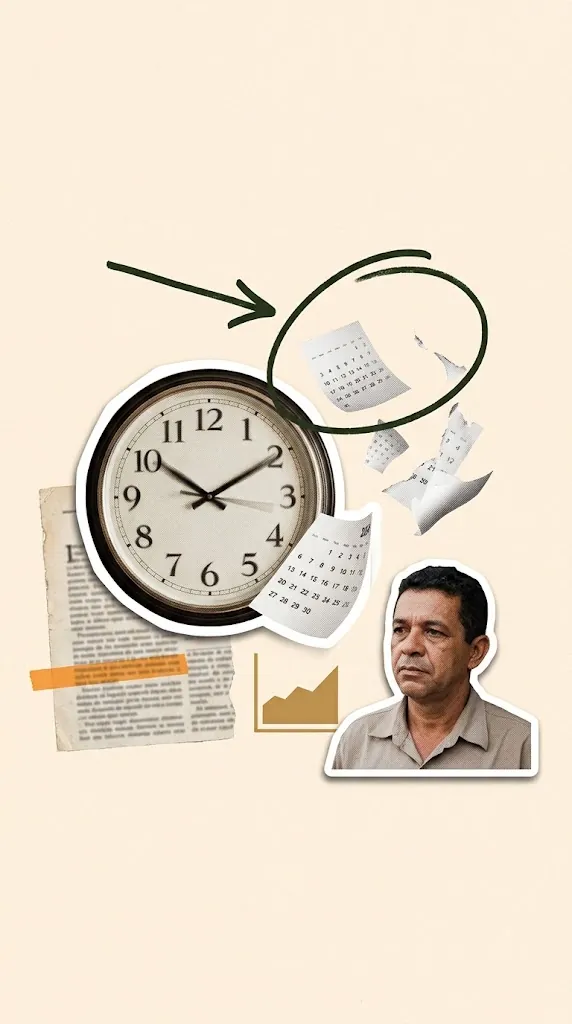
Anatomy of the composition
| Layer | Example | Purpose |
|---|---|---|
| Character | Cut-out portrait with a white border | Focal point |
| Symbolic objects | Clock, books, work tools | Tell who they are or what they live |
| Graphic elements | Arrows, circles, scribbles | Guide the eye |
| Textures | Newspaper clippings, tape, paper | Look and depth |
| Background | Beige or kraft paper | Unity |
Creating the artwork
With AI
The AI Prompts gallery has a Character in the center of the collage card. Fill in the subject and elements, choose the format and, to use a real person, tick "I will attach the photo" and send the photo with the prompt. For characters that appear across several videos, tick "I will attach character reference images". More in AI image prompts ready to animate.
Building it yourself
- Cut out the person in the Paper effect with a white border (see how).
- Click Add to collage: it enters as the central element.
- Use + Import elements to bring in objects and scribbles from an elements sheet (elements kit).
- Position everything with the Move tool, adjusting size and rotation.
Animating the portrait
Two possible orders
- Person first: introduces who they are, then reveals the context. Good for biographies and introductions.
- Person last: the elements build curiosity and the person enters as the reveal. Good for testimonials and impact stories.
Drag list items to set the order.
Suggested animations
- Character: Pop, Paste paper or Unfold (the default for Paper effect cutouts).
- Objects: Falling paper, Bounce in, Short slide.
- Arrows and circles: Draw line.
Camera
A slow Zoom in toward the face adds intimacy. Ken Burns gives a documentary feel. Turn on breathing elements so the scene does not freeze after the entrances. See camera moves in collages.
Use ideas
- A biography of a historical figure for class.
- A speaker introduction for an event.
- A customer testimonial with objects representing the problem and solution.
- "Meet the team", one portrait per person.
- A character profile for brand storytelling (see visual storytelling).
Frequently asked questions
Can I use photos of real people?
Yes, with the person's permission. For public and historical figures, check image usage rights.
How do I keep the same character across videos?
Use the option to attach character reference images in the prompts and keep the same border and cutout style.
What if the character's cutout includes bits of background?
Use the Eraser (E key) in Vox collage or redo the cutout in the Paper effect with Quick selection.
Conclusion
The character-centered collage is the most human composition in collage animation. A good portrait, a few meaningful elements and the right entrance order create memorable videos. Create your animated portrait in Editor de Vídeo Online.
Make your animated video now
Editor de Vídeo Online runs in your browser (Chrome or Edge): upload an image, pick a style and record an MP4. Nothing to install.
Try Editor de Vídeo Online →
Editor de Vídeo Online Team
Written by the Editor de Vídeo Online team, the in-browser animation tool for hand-drawn whiteboard videos, Vox-style collages and paper cutout effects.